

FLOW WELL
I Stopped Trying to Remember the Little Things and Started Keeping Lists in Trello
What this is
It’s family movie night and nobody can agree on what to watch. Or you finally have a free Saturday night and you can’t remember the name of the restaurant you swore you’d try soon. I used to have those moments all the time, and now I just pull up a list so my brain doesn’t have to work as hard.
This post is about how I keep those lists. I’ve used an app called Trello for many years, and I’m going to walk you through most of the boards I actually have open right now, from the beach house to the one our house manager and I share.
The whole system and my board ideas are free for everyone. At the very bottom is one section for paid subscribers, with 6 of my actual lists (two of them are specific for my Charlotte readers) that you can copy and make your own to use wherever you want to keep your lists. Even if you don’t use Trello, the list ideas themselves are worth reading and taking what works for you!
The story
My brain can’t hold as much as it used to. Or maybe it’s just that there is so much more to hold these days? Either way, in order to free up some mental load space I started keeping more lists, so the memory doesn’t have to stay inside my head. I’ve always been a list maker, even as a kid, so years ago I was on a mission to find a digital place for my lists that worked for what I needed at the time, and in that search I found Trello.
How Trello is set up
The way I’d explain it, Trello is organized into workspaces, and inside a workspace you have boards, which are sort of like pages. Inside each board you have lists, and each list is a column of cards. A card is an “item” on the list and it can hold a link, notes, comments, or a checklist.
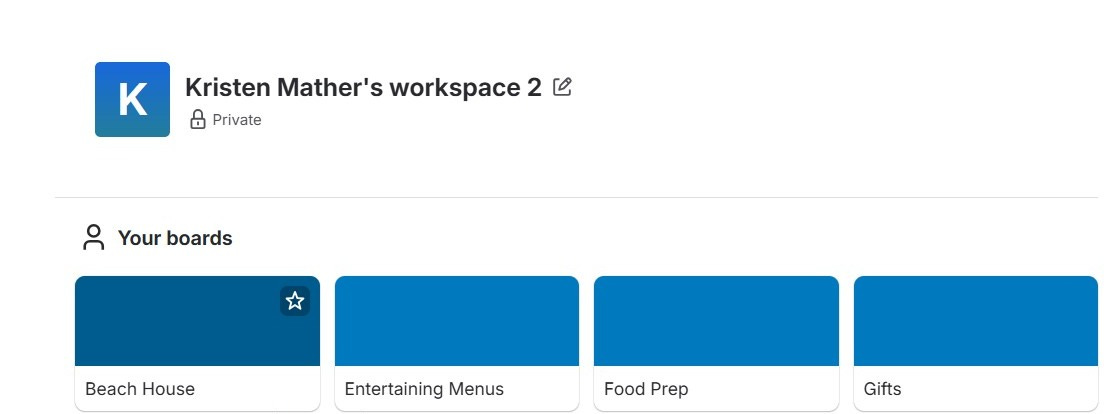
I LOVE that I can use the Trello app and Trello.com interchangeably, so when I’m working on my computer I can update Trello on the website and those changes are immediately visible in the app in my phone. That was a big selling point for why I chose Trello over other options initially. Not all apps these days have that ability and it is key for me – especially as I am trying to cut back on my phone use (aren’t we all lol).
For many years I used it for EVERYTHING. All my to-do lists, my priorities, my notes on whatever I was working on, maintenance lists, tenant information for some of our rental properties. It was a whole bunch of lists! I loved how I could get things out of my head, and it had some level of organization because of the boards/lists/cards setup. It’s super easy to move stuff from list to list or reorder cards within a list; you can tag people, add checklists, add priorities, etc. but I mostly was using it as a place to keep perpetual lists or back and forth lists between two people.
I know the original intent of Trello is as a project management tool. You can assign cards to people, add deadlines, and view everything as a calendar (I think). I never really used it that way. A while back I moved anything task-related over to Todoist, which is a different app that I love, love, love (that one gets its own post someday). I’m obsessed. I pretty much live in Todoist now because it helps me actually GET STUFF DONE, but I didn’t get rid of Trello when I made the switch for my tasks.
Trello is definitely better for institutional memory. It’s where I keep the things I want to remember that don’t have a timeline or a deadline associated with them. There are plenty of things I want to remember but just for some future time and that type of info has done better in Trello than on something more akin to a calendar (aka Todoist or Calendar app).
I think Trello is a good place to do brain dumps of all the possibilities so they aren’t floating around in your head, but the main point is to find SOMEWHERE to put these brain dumps. When it’s time to actually focus on something, you have all the potential options in front of you. I use it as a dumping ground for things I want to explore further, or things I need to remember later.
My lists all work the same way. Something comes up, I add a card, and it’s there when I actually need to remember it.
Most Frequent Lists
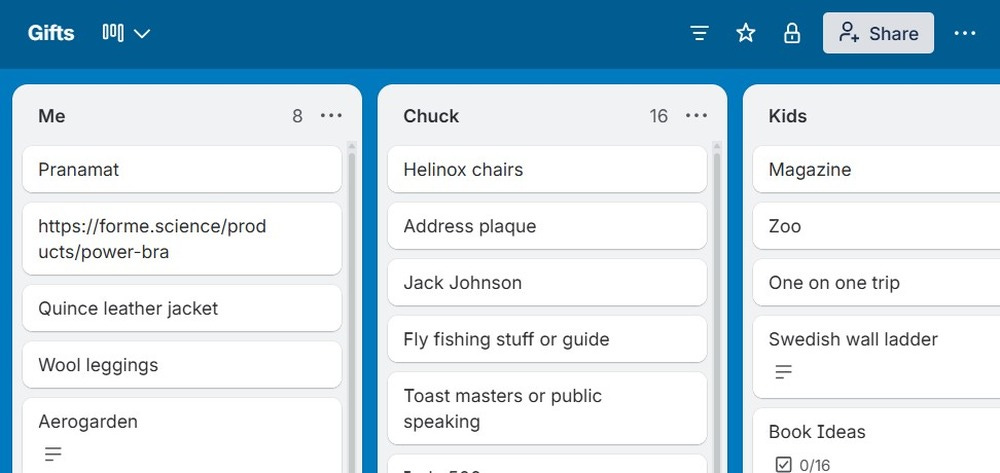
The Gifts Board - This board has one list per person. When I’m out and about and something comes up and I think, oh, my mom would love that, or my husband would love this, I add it. Sometimes it’s a link to an actual product and sometimes it’s just an idea or an experience. By the time I actually need to buy a gift, a whole year of ideas is sitting there waiting for me! (The actual holiday shopping I track in a spreadsheet, and that’s a post for another day.) It’s great for when my kids see something in the wild that they “have to have” and I say no – I add it to the list so I remember for the next birthday or holiday. Oftentimes I jot down experience ideas when I’m reading local “Things To Do” articles or when I hear my nieces say they are really into X or Y, I add it to the list. By keeping this list I feel like I always come across as a really thoughtful gift giver, but the key is not “thinking” about it at gift giving time but spending the 5 seconds thru the year adding ideas. P.S. I definitely keep a list of gift ideas for myself too 😊
Restaurant Board - We try to go somewhere new whenever we go out, since we don’t go out that often anymore due to, well, life. Whenever a new restaurant opens and I hear about it (and am interested), it goes on the list. When it’s time to make a reservation, I look at the list and pick one that has a reservation available. It makes date night so much easier! After we go, I drag the card over to a separate list of restaurants we’ve already tried (because my brain does forget these things these days lol). It’s also come in handy when book club is trying to plan a girls’ night dinner and everyone’s brains just blank on restaurants (besides the same tried and true). Highly recommend if you want to get out of your restaurant rut!
Movie/Book Board - We have a family movie list too, old school movies I used to like plus newer ones that others have recommended to me, so on family movie night nobody has to say “what are we going to watch?” I also keep a list of books I want to read or that were recommended to me, plus books recommended for my kids, so when they ask what they should read, I have a list available. Usually I get this from Instagrammers that give recommendations for “9 year old boys” or whatever it is, but ideas could come from anywhere. Having a spot to write them down so you don’t have to remember it later has been super helpful. Same as restaurants, I drag them to a second list to note which ones we’ve already watch or read so I don’t accidentally buy the same book series for my kids two years in a row (I’ve done it).
Family Lists
Vacation ideas - Anytime we say “oh, next time we’ll go there,” it goes on this list, because I never remember when next time comes around to plan. Sometimes it’s a location and sometimes it’s a specific hotel or resort, but it’s a place to start when it’s time to plan the next trip.
Christmas ideas and traditions - The month between Thanksgiving and Christmas is always so hectic. I want to make the most of the season but for a long time I couldn’t keep up because I would think “oh, we should go ice skating this winter,” in summer and then when it’s time to actually do something, I totally FORGET. So I keep the activities in one list and look at it when I’m planning the season so I don’t forget that one tradition that someone else in the family loves (sorry we missed The Nutcracker last year Chuck 😬).
Entertaining menus - A board with a list for various holidays (Thanksgiving, Christmas Eve, Christmas Day, a 4th of July party, a Halloween party, etc.) with the recipes and menus I’ve used before that were a hit. I repeat a lot of the same menus, so it’s all in one easy-to-find place. If I’m going to a summer BBQ I can look at the 4th of July list and pick something to bring. For Christmas we always eat the same things but the brain power to remember it all fades a little more year after year lol.
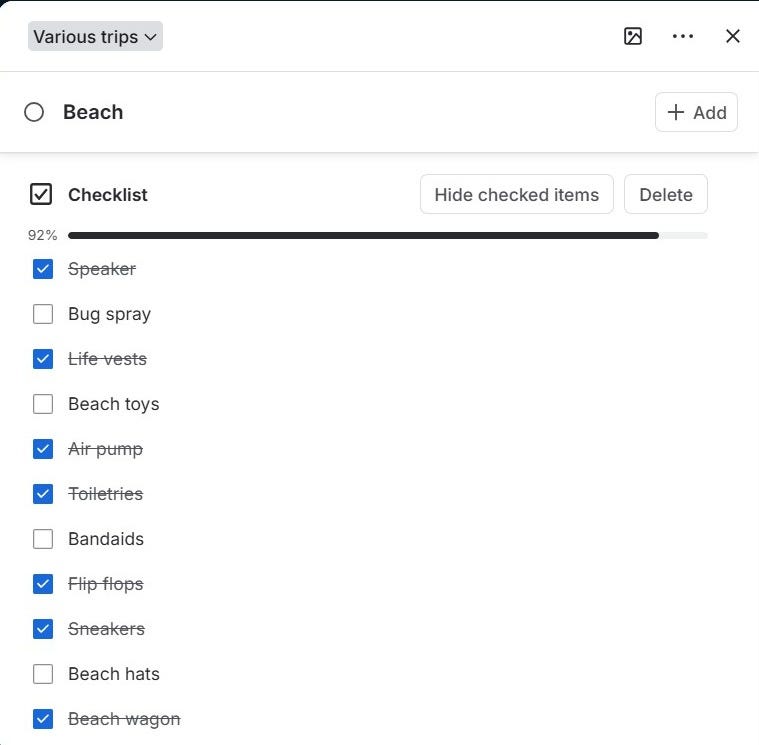
Packing lists - This is where the checklist inside a card comes in handy. I have a Packing board and then a list specific to the Beach with everything we always bring, so I don’t have to remember every time. We don’t go to Disney that often, but there’s a card for that with all the random things I only need on a Disney trip. This could also be organized by person rather than trip location. There are lots of ways you could structure it but the idea is that you put it here ONCE and then use the checkbox feature as you pack (you can uncheck them all to clear it once you’re done and reuse for the next trip).
Lunch dates and date nights - Friends and acquaintances I want to ask out to lunch sometime, and couples we want to go on a date night with. As you get older it gets harder and harder to make new friends and deepen friendships with those you already have. Without the list it either defaults to the same people over and over or just gets skipped. I push myself to reconnect (or connect at all) with people a few times a month so the list helps make it happen.
Babysitters - When it’s time to find one, I don’t want to rack my brain thinking of who we even use, so I go down the list.
Homeschool - When I started homeschooling I was clueless and didn’t even know where to start. So I just started writing down resources and programs people mentioned. Our homeschool board has lists of local programs to check out, one-day places to visit for field trips, and homeschooling books that have been recommended to me. When we say “hey, let’s do a field trip,” I have a list of ideas ready to go.
Medical - I also keep a medical board with a list per person in the fam. I jot down symptoms that come and go, illnesses, changes over the months, in real time, so when I’m talking to a practitioner (most often our homeopath who cares about these things) I have the whole picture without racking my brain about what month we had that lingering cough.
House Lists
Vendors and Tradespeople - We have a lot of rental properties, but even for our own house, having that list right there makes the task so much easier than trying to rack my brain about “what plumber did we call last time?”
Beach House Board - This board has multiple lists on it. One is maintenance items we noticed the last time we were there so we have a place to check them off once the property manager takes care of them (or a place to see what they did NOT get to). One is maintenance we’ve already completed, which I keep for tax purposes. I drag items from the pending maintenance list to the completed maintenance list when we see it is done. The third is a list of the items we keep in the owner’s closet there (it’s a rental so we lock our things up) so when I am packing for a trip I know what I DON’T need to bring. The fourth is a list of things I want to remember to bring next time to leave in our owner’s closet (whether it’s buy it or bring from home) and I update that one while we are actually visiting and then I can take care of it before the next time we go. All of the “remembering” items go into Trello. If you have a second property, or anything outside the norm you want to track all in one place, I think a board like this is great for it.
House Manager Board - When we hired a nanny I was still working full time, and we needed a way to communicate about the house and the baby that wasn’t a million texts. Before Trello it was a notebook at home. I would leave her a list of things I’d like her to handle during the day (either with the baby or when he was napping) and if I thought of something after I’d already left for work, I had no way to add it without a one-off text. Trello fixed that because you can add people to a board, and they can see the lists, use them, and comment back and forth. She could ask a question or add a detail and I could see it from work in real time. If she had a question that wasn’t urgent, she added it there and I could answer when I was out of my meeting. When she helped with meal prep, I’d put what I wanted prepped on a card and link the recipe right in it for her to open. We don’t have a full-time nanny anymore, but we do have some help sometimes, so she and I share a board. It has a list of things I want done every time she’s here, like unloading the dishwasher and wiping the countertops. It has a list of maintenance that runs on a schedule, like cleaning the dishwasher filter, changing the refrigerator filters and cleaning out the dehumidifiers. The list is there whether she does it or I do it. We also share a list of pantry and fridge staples. When she’s doing meal prep and we’re low on paprika, she adds paprika, I get a notification, and I add it to the shopping list.
Personal Lists
“Good things are always happening in my life” - This list is just for me and whenever there’s a glimmer or something good happens, I try to remember to write it down here. So often we focus on all the bad things that are happening, and those are the things we remember. A list of the good things is a great tool to help shift your mindset. Having a bad/negative day? Nothing going your way? Read the list and feel a little better.
Listening and Learning - Are you like me and you buy workshops or courses that seem amazing and then they immediately get lost in your inbox and you never actually do it even though you paid for it mostly because you’re not sure where to log in or what you even bought?!?! I put every class or course I buy that I have to listen to or watch on a list. Even if something is sent to me weekly or monthly, it gets a card. When I have a few minutes on a walk or a longer drive or an afternoon by myself and I’m wondering what to do, the list is ready with links. I move them or mark them complete once I’ve done them, so I know what’s still out there. I am much more likely to actually complete the courses/classes/workshops if I know exactly where to find them with ease.
Articles I want to read - Similar to the listening item above, if I have a link to the article I can go right to the list when I have spare reading time.
Sale list - Things I want to sell on Facebook Marketplace or in Facebook groups, since I can’t always do that in the moment I notice them. When I find stuff all over the house I try to move it to a central location but sometimes that doesn’t work so having a list available for when I have time to do the posting has come in handy.
Partner Meeting - Things I want to talk to my husband about. We have a meeting cadence, and if I don’t write something down, I will forget it. That list also holds tasks I might want to delegate, the things I want to put on his plate, so when it’s time, I have them available in a moment.
Work Lists
Businesses - For my biomagnetism practice I have a list of other practitioners to collaborate with and a list of places to advertise. I kept a list of ideas for this Substack too, before it was even a Substack. It was just a list of favorite things, advice and products I’d tried. Any business that requires brainstorming at times (all of them) can benefit from having their own board.
Block schedule - For a while I used Trello for my schedule too (in a way). The board was called Block Schedule and each list was a type of work to be done during a particular time block. Topics included things like Business Development, Personal Development, Errands, Rental House Business and Household Maintenance. Instead of listing a time for every activity, when it was time for that block I’d pick things off that particular list. I do think this is a really helpful tool for someone doing block scheduling, it just wasn’t for me in the end, and as I mentioned, my to-dos live in Todoist now.
Could you do this in Apple Notes?
You could probably do a lot of this in Apple Notes or other notetaking apps for sure. I use Apple Notes for a few things, like my library card number that I type in at the library, or our TSA PreCheck and trusted traveler numbers. It’s only a few things, not a long list. I needed something a little more organized, with more options for how I view a list, checklists and assigning people. Maybe Apple Notes does all of that, I just don’t know because I found Trello a long time ago and it stuck. I found it immensely helpful in managing my mental load. I chose Trello over other options several years ago and while I’m sure plenty of new options exist that will work the same way, Trello has worked for me so I haven’t had to seek out a new option for list keeping (but I did find a new, better option for to-dos, which I’ve already mentioned).
The short hit
Want less floating around in your head? Make a board for each part of your life, and every time you catch yourself saying “we should...” put it on a list.
My recommendation is to use Trello (trello.com or the app - the free version is all I use) but literally anywhere you can keep a list will work to help your mental load!
My lists
Paid subscriber can access a link below to a file that contains 6 of my actual lists (two of them are specific for my Charlotte readers). You can copy it and make it your own, so you never have to rebuild the Thanksgiving menu or the Disney packing list from memory again. You can leave them in the Google Sheet and use it from there or transfer it to Trello, or Apple Notes, or anywhere else you want to keep these perpetual lists as I like to call them.
Entertaining menus (July 4th, Thanksgiving, Christmas Eve, Christmas charcuterie, Christmas breakfast)
Disney packing list
Family movie list
House maintenance lists
For my Charlotte readers: Charlotte-area Christmas tradition ideas
For my Charlotte readers: Restaurant list
As noted, the link is only available to paid subscribers. If you’re a free subscriber, consider upgrading to get access to these and all other resources in the growing library!
Before you go
What’s one list you keep, or one you wish you’d started years ago? Put it in the comments so we can all steal each other’s ideas!
Talk soon,
Kristen ❤️